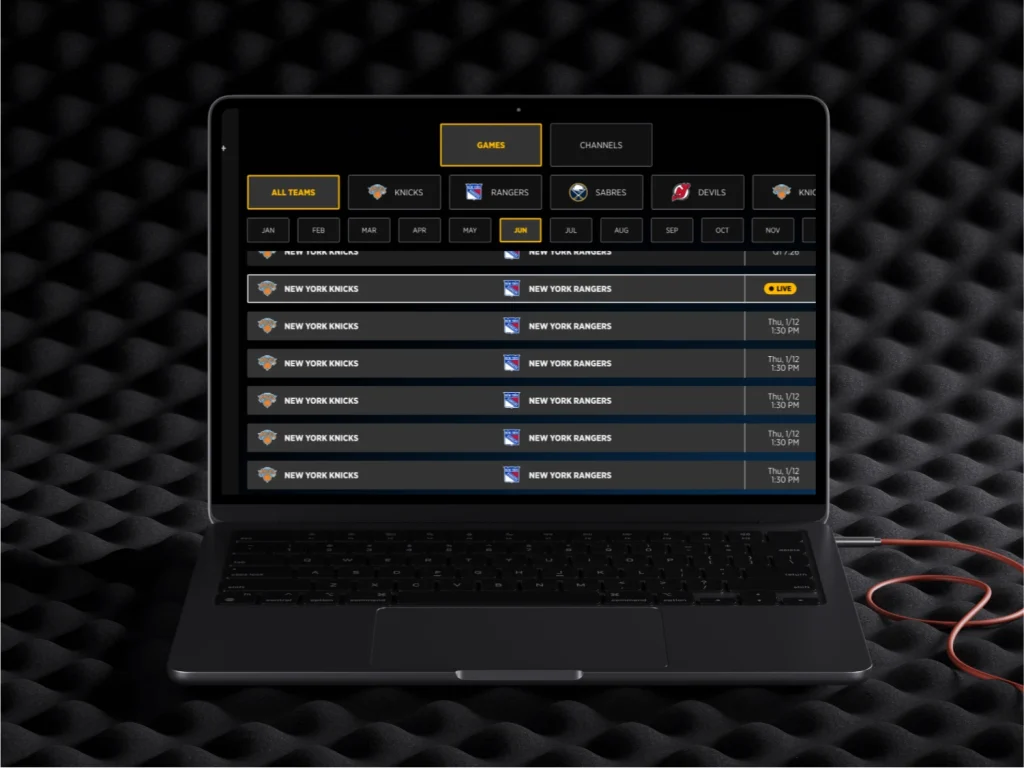
Gotham Sports (Prevously MSG+ UX) — Live Event and PPV Interaction Design
MSG+ — Event Streaming & Interaction Design for Live Sports & Entertainment.
services
Sr Product Designer
client
MSG Networks
year
12 months (2023)
category
OTT, All platforms TV app
Agency
Perficient.com
My Role:
I was brought in as the Senior UX/UI Product Designer embedded within the Intive team contracted by Madison Square Garden Entertainment Corp. — responsible for leading the end-to-end interaction design of the MSG+ video player across every platform the product lived on.
This wasn’t a support role. I owned the design of every user-facing interaction: how fans move through live content, how they access real-time data without abandoning their stream, how the player behaves differently on a phone held in a sports bar versus a Roku remote in a living room versus a Smart TV across the room.
My mandate was to make a technically complex, multi-platform streaming product feel effortless — for fans who are emotionally invested, time-pressured, and deeply unforgiving when the experience gets in their way.
Challenge:
MSG+ needed to compete in one of the most demanding arenas in consumer product design: live sports streaming.
The ask was sharp — improve live event discovery and interactive features to increase live tune-in rates and reduce drop-off during events. But underneath that brief was a harder problem: live sports fans don’t behave like ordinary streaming users.
They toggle between the game and stats. They want replays without missing what’s live. They switch audio feeds between the home call and the away broadcast. They check odds mid-play. They do all of this while the clock is running — and every second of friction is a second they might leave.
The existing interaction model wasn’t built for that urgency. Features existed. The experience of using them under live conditions did not.
Context:
MSG Networks is the regional sports broadcasting powerhouse behind the New York Knicks, Rangers, Islanders, New Jersey Devils, and Buffalo Sabres — teams with some of the most passionate and demanding fanbases in North American sports.
MSG+ was the platform built to bring those fans into the streaming era: live games, VOD content, personalized offers, and real-time interactive features — available on subscription across per-game, monthly, and annual tiers, with cable-authenticated free access for existing providers.
The product was ambitious. The audience was unforgiving. The interaction design had to earn their trust in real time, during the moments that mattered most — because in live sports, there are no second chances to make the right play.
Platform:
MSG+ ran across six distinct surfaces, each with its own interaction paradigm, hardware constraints, and user context:
Web (Desktop) — Primary surface for high-engagement sessions. Full keyboard and mouse fidelity. Users multitasking across tabs while watching live.
Mobile iOS & Android — Vertical-first, thumb-driven, often used in noisy or distracted environments. Notifications, quick-access overlays, and minimal tap depth were critical.
Tablet — Hybrid surface demanding both the depth of desktop and the ergonomics of mobile. Common for couch viewing alongside the main TV screen.
Roku — Remote-driven, 10-foot UI, living room context. Interaction design constrained to directional navigation with no touch, no cursor, no shortcuts.
Smart TV — Largest canvas, most passive viewer context. Feature visibility and readability at distance were non-negotiable.
Each platform required its own interaction logic. The design system had to hold them together as a single coherent product — not five separate apps wearing the same logo.
What I led:
Interaction Design for Live Features Designed the full interaction system for the live overlay layer: score widgets surfacing real-time game data without interrupting the stream, multi-audio feed selection for switching between broadcast calls, quick replay access allowing fans to rewind key moments without leaving the live timeline, and closed caption controls built to accessibility standards across all platforms.
Cross-Platform Player Architecture Defined how the video player behaved differently per platform — what features appeared on each surface, how controls adapted to input hardware, and how the interaction model scaled from a 5-inch phone screen to a 65-inch Smart TV without losing coherence or functionality.
User Scenario Mapping Mapped every significant user scenario across device types and content categories: the fan catching a live game on mobile during a commute, the subscriber rewinding a power play on tablet, the living room viewer navigating with a Roku remote to find the alternate feed. Each scenario stress-tested the interaction model against real use.
Design System Contribution Built and documented reusable interaction components for the player — control states, overlay behaviors, icon systems, and accessibility specifications — integrated into the shared design system leveraged across MSG product teams.
Validation & Dev Alignment Worked directly within the Scrum team cycle — presenting interaction flows for feasibility review with engineering, iterating based on technical constraints, and staying embedded through implementation to protect interaction fidelity at the moment of build.
A/B Test Architecture Designed and documented a measurement plan for suggested A/B tests targeting tune-in rate lift — defining test hypotheses, success metrics, and variant logic for features including the live stats overlay and quick replay entry point.
Outcome / Impact:
The MSG+ interaction system delivered a live streaming experience where the product got out of the fan’s way — putting the game first and making every feature feel like it had always belonged there.
The live overlay layer gave high-value users instant access to real-time stats, alternate audio feeds, and quick replays without leaving the stream — addressing the core retention risk identified in research.
The cross-platform interaction model maintained coherent behavior from mobile to Smart TV, with platform-specific adaptations that honored hardware constraints without fragmenting the product experience.
A measurement plan for A/B testing was designed and documented — defining test hypotheses and success metrics for tune-in rate lift on the live stats overlay and replay entry points, giving the product team a ready framework for data-driven iteration post-launch.
The design system components built for MSG+ — player controls, overlay states, icon library, and accessibility specifications — were integrated into the broader product design system, reducing design and development time for future feature work across the platform.
Design process
Discovery
IA
Low-fi
Mid-fi
Mid-fi
Test
Handoff
More Details
Remote-friendly navigation:The Design Process:
Phase 1 — Discover: Understanding the live fan The process started not with screens but with scenarios. Live sports audiences have distinct behavioral profiles — binge viewers who watch full games with deep engagement, and casual fans who dip in and out, following score updates and catching key moments. Both use the same product differently. Both needed to be served without compromising the experience for the other.
Research focused on when users wanted data, how they navigated during live content, and what caused them to leave — either the stream or the app entirely.
Phase 2 — Define: Interaction model before interface Before a single screen was designed, the interaction model was defined — the rules governing how overlays appear and disappear, how feature access is structured to minimize tap depth during live moments, and how the player behaves when content type shifts from live to VOD to replay.
This phase produced the interaction logic that every screen and every platform inherited. Getting it right here prevented rework at every downstream step.
Phase 3 — Design: Flows, wireframes, and high-fidelity Interaction flows were built first — user flows and screen flows exchanged with the engineering team for feasibility check and the product team for alignment. Wireframes were iterated through peer review, PO review, and dev team feasibility validation before moving to high-fidelity.
High-fidelity prototypes were produced for the live overlay system, multi-feed selector, and replay controls — platform-specific, interaction-complete, and built to the pixel standard that an entertainment brand of MSG’s caliber demands.
Phase 4 — Deliver: Specs, handoff, and implementation Annotated interaction specifications, component documentation, and developer handoff assets were delivered through Figma. Design remained embedded through the engineering build — reviewing implementations, flagging deviations from specified behavior, and iterating on edge cases that only appear when real content meets real interaction.
The Investigation:
The research surfaced a finding that reframed the design direction entirely.
The problem wasn’t feature coverage. It was feature access under live conditions.
High-value users — the subscribers who drove the most engagement and represented the clearest case for retention — didn’t want more features. They wanted the features that existed to be available instantly, without breaking the live experience to get them.
The key insight: high-value users want live stats accessible without leaving the stream. Not in a separate tab. Not behind a pause. Inside the live moment, where the data has context.
This seemed straightforward until the investigation went deeper. Surfacing data inside a live video player is an interaction design problem with compounding constraints: the overlay can’t obscure critical game action, it can’t demand attention at moments of peak play, and it has to disappear as quickly as it appears without leaving the user disoriented about where they are in the interface.
The investigation also revealed a second structural tension: the same feature set needed to be accessible via a 5-inch touchscreen with a thumb and via a Roku remote with four directional buttons. These are not the same interaction problem. Designing one interaction that degraded gracefully across both — rather than building platform-specific logic for every feature — became the central design challenge of the entire project.
Both findings shaped the architecture of everything that followed.
The Takeaways:
Live products demand a different kind of design discipline. In static or async products, a user can pause, re-read, and recover from a confusing interaction. In live sports streaming, confusion during a key play is abandonment. Every interaction had to be designed for urgency — fast to access, impossible to misread, and invisible when not needed.
Interaction models are infrastructure, not decoration. The decision to define the interaction logic before designing screens was the most valuable choice on this project. It meant that when platform-specific edge cases emerged — and they always do — there was a structural framework to answer them from, not a collection of screens to patch.
The 10-foot UI is a design education in itself. Designing for Roku and Smart TV forced a clarity of hierarchy that improved every other platform. When you can only navigate with four directional buttons and a select, you understand immediately which features are truly essential and which were just convenient on a touchscreen.
Accessibility isn’t a checklist — it’s a quality bar. Closed caption design, contrast compliance, and remote navigation accessibility were built into the system from the start — not retrofitted at the end. Products at this scale, serving audiences of this size, have no excuse for treating accessibility as optional.
Pixel precision matters more when the brand is the product. Working within the MSG entertainment ecosystem raised the standard for visual execution. The interaction model could be perfect, but if the implementation diverged from the high-fidelity spec at the pixel level, the brand felt cheaper. Staying embedded through engineering wasn’t optional — it was what separated a good design from a delivered one.
“I design live experiences for high-stakes entertainment products — if you’re building something that has to work in the moment, let’s talk.”